Back to Blog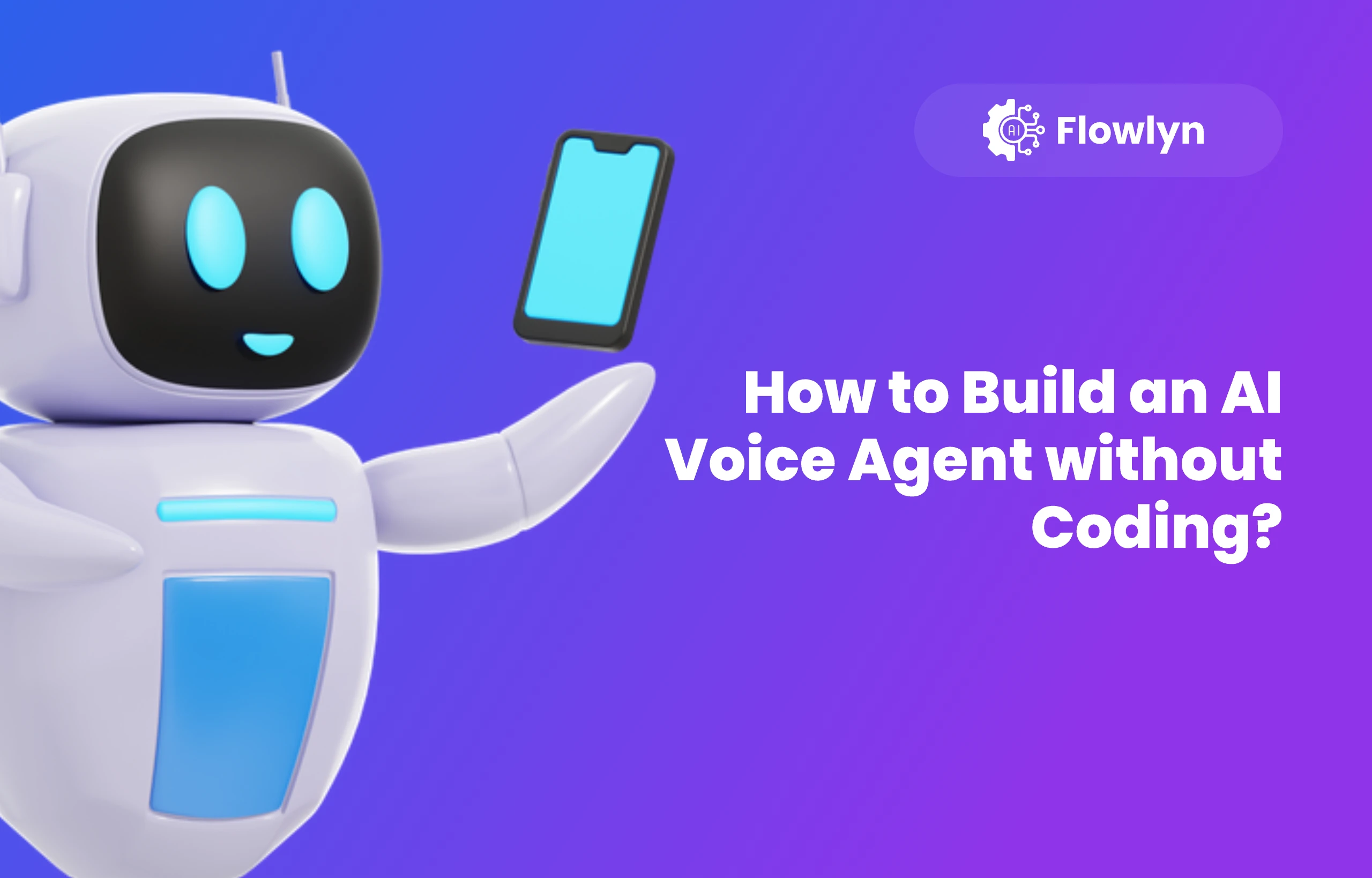
AI Technology
How to Build an AI Voice Agent without Coding?
Discover the solution to build an AI voice agent without coding in 2026. Includes actionable tips and steps to build voice agents.
December 12, 2025
10 min read

When you search for "AI voice agents" on Google, you find a crowded market of expensive SaaS platforms. These out-of-the-box products charge high monthly fees and hide key customization behind enterprise paywalls.
Users in communities like r/voiceagents and r/n8n showcase this frustration. They grow tired of fake demos and hefty fees, and they now favor production-ready, cost-efficient stacks.
You can choose this better path.
We’re a leading n8n workflow automation services provider, therefore, prepare this guide to show how you build a custom AI voice agent without code and without high costs.
Methods to Build an AI Voice Agent in 2026
Below are three strong ways to build a production-ready agent in 2026 without raw code.
- No-Code Orchestrators - Platforms like Vapi, Retell, and Synthflow work as a visual control center and solve audio latency issues that hinder DIY attempts. They package the Brain, Voice, and Ear into one dashboard and let you deploy human-like agents in minutes with drag-and-drop tools.
- The Workflow Automation Stack - This method goes beyond simple calling and connects voice agents to broad business workflows with visual tools like n8n. For example, you build a system that scrapes leads, qualifies them, and triggers calls on real-time cues. Growth hackers use this stack when they need agents to talk, update CRMs, and fill Google Sheets right after a call.
- The Hybrid SIP Approach (Asterisk/FreePBX + AI) - This method connects an AI model to your private phone network through SIP Trunking. You keep your low carrier rates and business numbers and pay the AI provider only for intelligence. It needs some setup, but teams cite it as the most cost-efficient option for high-volume enterprise use.
Your best method depends on your balance between convenience and cost. In this guide, we’ll of course not cover or promote the [no-code SaaS-based](/blog/n8n-for-saas) tools. But rather, offer a cost-effective way for you to build AI powered voice agents without coding.
First, let’s understand why the ready-made voice agents are not a good option for you.
Why Not Use Ready-to-deploy Voice Agents in 2026?
To build a cost-efficient agent, you need to understand the pricing trap in most AI voice platforms.
Many expensive SaaS tools for AI voice agents act as wrappers. They bundle a phone carrier, an AI model, and a voice synthesizer, then sell the bundle at a steep markup. They charge for the package instead of the usage.
You skip this markup when you buy each component yourself and link them with visual tools, the same way a developer builds a stack.
How to Build Your Own AI Voice Agent Workflow in N8n?
The Workflow Automation Stack gives businesses more than a polite receptionist. SaaS tools handle simple calls, but they fail when the agent must check inventory, update a HubSpot deal stage, or book a slot on a complex team calendar.
When you use n8n as your central brain, you build an agent with full access to your business tools.
In n8n, your "Voice Agent" is simply a workflow that runs every time the phone receives a voice input. It connects two components - a call processor (like Twilio) with an AI model (like OpenAI or Anthropic).
Here’s a high-level overview of the AI-powered voice agent setup with Twilio in n8n:
Part 1: Build the Logic in n8n
This is where your phone call becomes a live AI workflow. Each node handles one step: listening, thinking, speaking, and replying.
- The Trigger (Webhook Node) - Create a Webhook node and set the method to POST. This generates a URL. Paste it into Twilio so Twilio sends audio or text here.
- The Ear (Transcribe Audio) - If you skip Twilio’s transcription, add an OpenAI node. Select the Audio resource and Transcribe operation. This converts the caller’s voice into text the AI reads.
- The Brain (AI Agent Node) - Connect n8n’s AI Agent node to a Window Buffer Memory so the agent remembers the conversation. System Prompt: “You are a support agent for [Company]. You check order status and schedule callbacks.” Tools: Add tools the agent uses, like Google Sheets to look up an Order ID or Google Calendar to check availability.
- The Voice (Text-to-Speech) - After the AI generates a response, it must speak. Add an OpenAI or ElevenLabs node. Select Text-to-Speech to create an MP3 file.
- The Response (Twilio TwiML) - Use a Respond to Webhook node. Phones can’t receive plain text, so return TwiML. For example, Configuration: Set the response type to XML.
Body:
<Response>
<Play>url_of_your_generated_audio_file</Play>
<Gather input="speech" action="your_n8n_webhook_url" method="POST" />
</Response>
The <Gather> tag keeps the line open and waits for the caller to speak again. This creates a conversation loop.
Part 2: Connect to the Phone Network
This step links your n8n workflow to a real phone number so calls trigger your AI agent.
- Go to Twilio Console.
- Navigate to Phone Numbers → Manage → Active Numbers.
- Click your phone number.
- Under Voice & Fax → A Call Comes In:
- Choose Webhook.
- Paste your n8n webhook URL.
- Set method to POST.
Your voice agent is now connected to the phone network and will run every time someone calls.
Book a Free Strategy Call
Talk to our automation experts about your specific challenges. We'll share proven strategies that have helped 500+ businesses save 40-70% on operations.
Book Free CallBetter Option: Use n8n Workflow Templates for AI Voice Agents
If building the workflow from scratch (as shown above) feels too manual, you can skip the "drag-and-drop" phase by importing community-built templates.
These pre-configured workflows come with the logic, memory, and API connections already wired up. Here are the best production-ready templates to start with in 2026:
AI Voice Chatbot with ElevenLabs & OpenAI
The Voice RAG Chatbot with ElevenLabs and OpenAI in n8n creates an interactive voice assistant ideal for shops, restaurants, and service businesses.
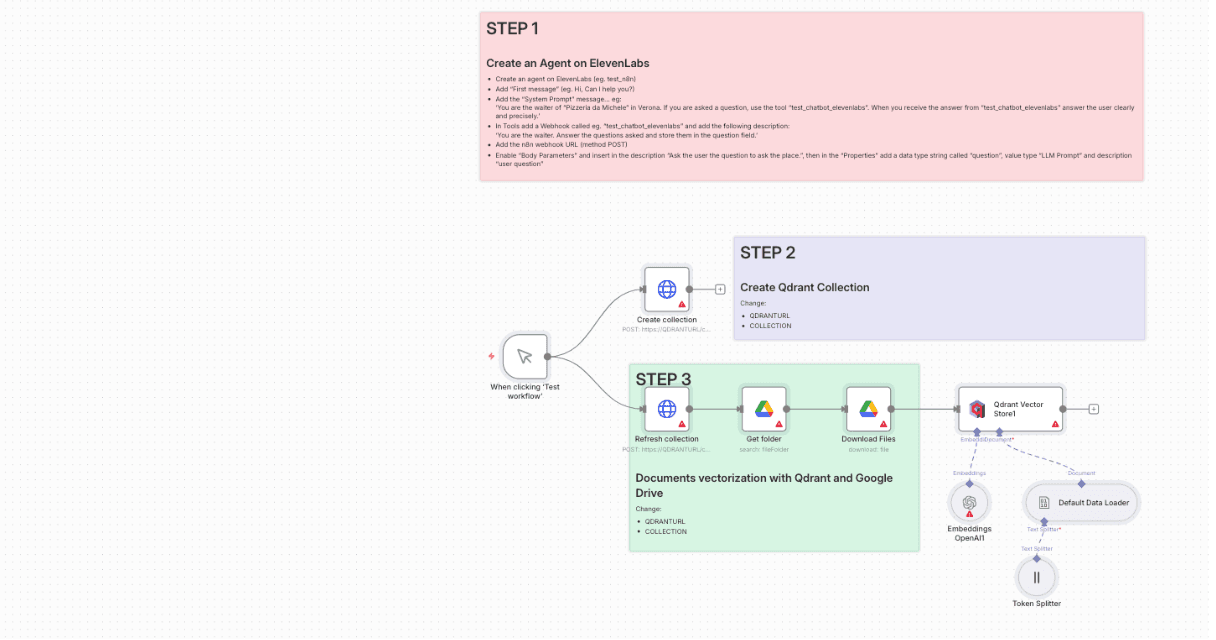
When a user speaks, ElevenLabs triggers an n8n webhook, sending the question to the AI Agent. The agent retrieves relevant knowledge from a Qdrant vector database and uses OpenAI to generate an accurate, context-aware answer. n8n then sends the reply back to ElevenLabs, which converts it into natural speech for the user.
Third-party integrations used:
- ElevenLabs
- Qdrant Vector Database
- Google Drive
- OpenAI (Embeddings + Chat Model)
- Website Chatbot Widget (ElevenLabs Agent ID)
Create a Customer Support Voice Agent with GPT-5, ElevenLabs & Calendar Booking
This template lets you add a fully automated, AI-powered voice assistant to your business without needing any engineering background. It combines OpenAI for reasoning, ElevenLabs for natural speech, and Google tools for real-time data, creating a voice agent that can answer questions, check availability, and even book appointments.
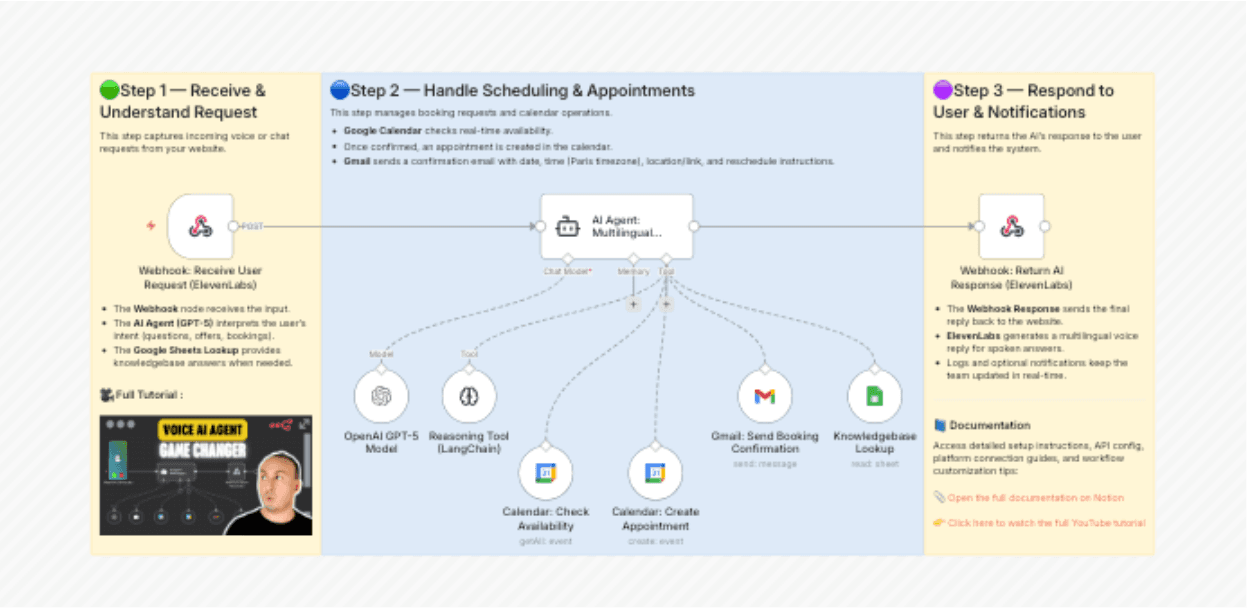
Instead of relying on human staff or limited chatbot widgets, this workflow provides fast, multilingual, 24/7 support. Customers can speak naturally, get accurate answers, and complete actions instantly. It’s designed to reduce workload, improve response time, and deliver a smooth voice experience directly from your website or phone line.
Third-party integrations used:
- OpenAI
- ElevenLabs
- Google Sheets
- Google Calendar
- Gmail
While voice is great for calls, you can also scale your text communication by setting up an AI email agent.
FAQs
How much does it cost to build an AI voice agent in 2026?
The cost depends on your method. SaaS Platforms often charge $0.10 to $0.20 per minute, plus monthly subscription fees ranging from $50 to $500. Custom workflow (n8n + Twilio) is the cost-efficient route. You pay roughly $0.013/min to Twilio and pennies for OpenAI tokens.
Do I need Python coding skills to build an AI agent?
No. While many developers use Python or LangChain, you can build production-ready agents using No-Code tools like n8n.
What are the best business use cases for AI voice agents?
Based on current market trends, the most popular applications include:
- AI Voice Agent for Real Estate: Qualifying leads, booking viewings, and following up on property inquiries.
- Healthcare & Dental: Managing appointment bookings and reminders to reduce no-shows.
- Customer Support: Handling FAQs, order tracking, and "Tier 1" support tickets.
- Cold Calling/Sales: Initial outreach to qualify prospects before handing them off to human sales closers.
Can AI voice agents sound like real humans?
Yes. Modern text-to-speech engines like ElevenLabs have eliminated robotic tones. They now offer ultra-realistic AI voices that include pauses, intonation, and emotional nuance.
Is it legal to use AI agents for outbound calling?
Yes, but you must comply with local regulations. In the US, this includes FCC regulations and TCPA laws. You should generally obtain consent before calling, provide an option to opt-out, and ensure your Twilio numbers are verified (A2P 10DLC compliance) to avoid being marked as spam.
Get a Custom Workflow Automation Solution
You now have the blueprint to build a voice agent yourself. The "n8n + Twilio" stack is powerful, cost-effective, and flexible.
However, moving from a prototype to an enterprise-grade system brings a new layer of complexity. Handling thousands of concurrent calls, integrating with legacy ERP systems, ensuring strict data security, and managing latency at scale requires more than just a template—it requires engineering.
This is where Flowlyn comes in.
We are an enterprise-level workflow automation partner. We don't just connect nodes; we architect robust, scalable, and secure automation infrastructure for businesses that cannot afford downtime.
Why partner with Flowlyn?
- Beyond the Basics: We handle complex logic, such as multi-database lookups, dynamic voice switching, and real-time payment processing during calls.
- Production Reliability: We build error handling and fail-safes into every workflow, ensuring your agent never "hangs" on a customer.
- Seamless Integration: Whether you use Salesforce, HubSpot, SAP, or a custom internal tool, we ensure your voice agent reads and writes data perfectly.
Don't let technical hurdles slow down your AI adoption. Let us build the engine so you can focus on driving the car.
Book a Free Strategy Call
Talk to our automation experts about your specific challenges. We'll share proven strategies that have helped 500+ businesses save 40-70% on operations.
Book Free Call
About Divyesh Savaliya
Divyesh has over 12 years of experience in business automation and has helped 500+ companies streamline their operations using AI and workflow automation.
In This Article