Back to Blog
Automation
Shopify Workflow Automation - Guide
A complete guide to Shopify workflow automation to streamline tasks, reduce manual work, and improve store efficiency.
January 28, 2026
15 min read

Workflow automation has become a cornerstone of modern ecommerce operations, enabling businesses to manage processes efficiently, reduce manual work, and focus on strategic growth.
For Shopify merchants, Shopify Flow stands out as a native platform tool that brings powerful automation capabilities directly into the store admin. Designed to support a wide range of tasks from order management to inventory updates, they help merchants streamline complex operations using intuitive, no-code workflows.
In this guide, we explore the core principles and benefits of Shopify workflow automation, focusing on how Shopify Flow empowers merchants to transform repetitive processes into reliable, automated systems that operate behind the scenes.
What Is Shopify Workflow Automation?
Workflow automation refers to the use of technology to execute repetitive business processes without manual intervention. Essentially, it allows merchants to define a set of rules or conditions and let the system take action whenever those conditions arise.
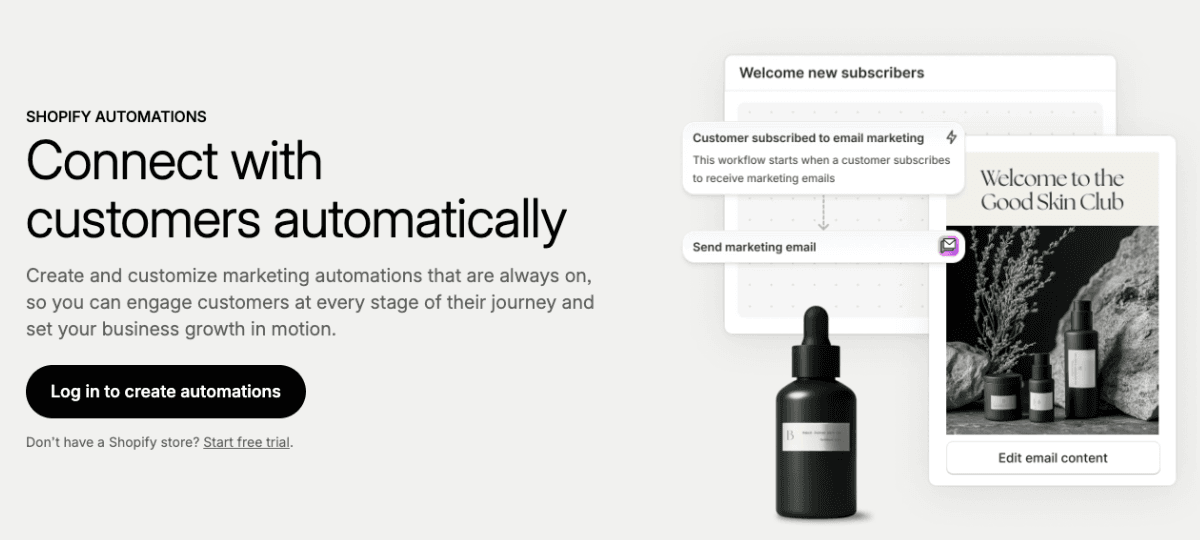
In the context of Shopify, this means automating operations that would otherwise require manual effort like tagging orders, updating inventory, or sending notifications.
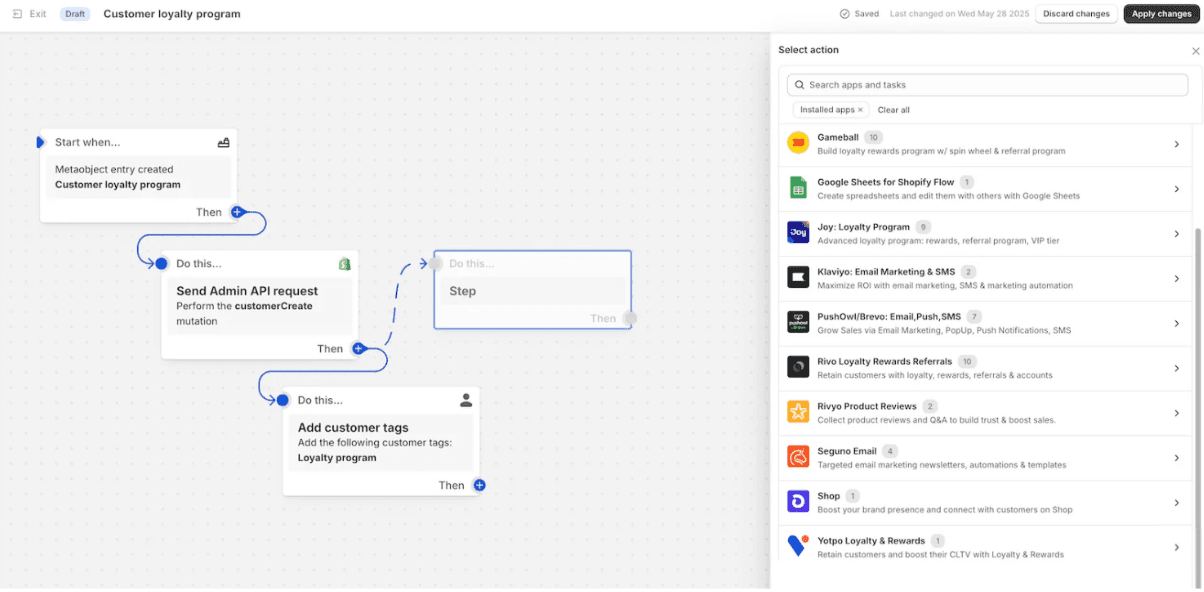
Using Shopify Flow, an online automation platform that integrates with your Shopify store and connected apps, allowing you to create workflows using triggers, conditions, and actions. These components form simple logic sequences that react to events in your store or associated applications.
Unlike traditional automation solutions that require coding or third-party integrations, Shopify Flow uses a drag-and-drop builder to help merchants design automation visually. This approach makes sophisticated automation accessible even to non-technical users, allowing teams to automate business logic without writing a single line of code.
Why Automate Shopify Workflow?
Manual data entry and repetitive administrative tasks are often cited as the "growth killers" of digital brands. When you transition from a handful of orders a day to hundreds or thousands, your operations must evolve.
1. Massive Reduction in Manual Labor
The most immediate benefit is time reclamation. If a member of your team spends two hours a day manually tagging "high-value" orders or moving data from Shopify into a Google Sheet for the fulfillment team, that’s 10 hours a week lost. Automation handles these micro-tasks instantly.
2. Elimination of Human Error
Humans are prone to fatigue and distraction. A staff member might forget to flag a high-risk order or accidentally mark an item as "in stock" when it isn't. An automated workflow follows logic strictly; it doesn't get tired and it doesn't skip steps.
3. Real-Time Responsiveness
Customers expect instant confirmation, and warehouses need immediate updates. Automation ensures that as soon as a trigger occurs—like a product hitting a low-stock threshold—the necessary action (like notifying a supplier) happens in milliseconds, not hours later.
4. Seamless Scalability
Automation provides the infrastructure for growth. It ensures that your operational quality remains consistent whether you are processing 10 orders or 10,000. It allows you to scale your revenue without necessarily having to scale your headcount at the same rate.
Options to Automate Workflows in Shopify
Depending on your store's complexity and your technical comfort level, there are three primary ways to approach automation.
1. Shopify Flow
Shopify Flow is the native, no-code automation platform built directly into the Shopify admin. It is available to merchants on Shopify, Advanced, and Plus plans. It uses a visual, "If This, Then That" (IFTTT) logic style that makes it accessible to non-technical store owners while remaining powerful enough for complex internal operations.
2. Dedicated Automation Apps
The Shopify App Store is home to hundreds of specialized automation tools. Some focus on specific niches, such as:
- Matrixify: Specifically for complex data bulk-imports and exports.
- Arigato Automation: Offers a library of pre-built "recipes" for tasks that might be slightly outside the scope of native Flow.
- Order Printer: Automates the generation and delivery of invoices and packing slips.
3. Third-party Solutions (iPaaS)
Integration Platform as a Service tools like n8n, Zapier, and Make act as a bridge between Shopify and the rest of the internet. These are essential when you need to connect your store to external software that doesn't have a native Shopify app, such as a custom ERP, a specific CRM like Salesforce, or a legacy database.
How to Build Automations Using Shopify Flow?
Shopify Flow operates on a simple but rigid tripartite logic structure. Understanding these three pillars is essential for building any workflow.
The Three Pillars
- Triggers: These are events that happen within your store or a connected app that "wake up" the workflow Examples include Order Created, Inventory Level Changed, or Customer Created.
- Conditions: These act as filters. They ensure the action only happens if certain criteria are met. For example, "Only proceed if the order total is greater than $500" or "Only proceed if the customer is located in Canada."
- Actions: This is the final step where the work gets done (e.g., Add Customer Tag or Send Slack Message).
Step-by-Step Implementation
- Navigate to your Shopify Admin, click on Apps, and select Shopify Flow.
- Start from a blank canvas or choose from a library of templates.
- Select what event initiates the process. If you want to automate VIP tagging, your trigger is "Order Created."
- Add a condition to specify your needs (e.g., order / total price > 1000).
- Choose an action (e.g., "Add Customer Tag" and type in "VIP").
- Shopify Flow allows you to view "Past Runs" to see exactly where a workflow succeeded or failed, making it easy to troubleshoot.
How to Automate Shopify Using n8n?
While Shopify Flow is excellent for internal tasks, n8n is a "fair-code" tool that offers unparalleled flexibility for merchants who need to go beyond the Shopify ecosystem. It is particularly popular because it can be self-hosted, giving you total control over your data.
Before you can begin building out these advanced workflows for your store, your first fundamental step will be to connect n8n to Shopify properly.
Why use n8n over Flow?
n8n workflow automation allows for multi-step branching and data manipulation using JavaScript. If you need to take an order's data, calculate a custom tax rate based on an external API, format that data into a specific JSON structure, and then post it to a private warehouse API, n8n is the tool for the job.
Setting up an n8n Workflow
- In n8n, start with a "Webhook" node. You then take the URL provided by n8n and paste it into the Settings > Notifications section of your Shopify admin.
- Use n8n’s Shopify node to connect via API credentials. This allows n8n to not just receive data, but to reach back into Shopify to pull more info or update records.
- Drag and drop nodes for different services. You can connect Shopify to Google Sheets, Discord, OpenAI (for sentiment analysis on reviews), and more.
- Once your logic is mapped out, activate the workflow. n8n will now listen for that Shopify webhook and execute the sequence automatically.
Shopify Flow vs. n8n: Which One to Choose?
| Feature | Shopify Flow | n8n |
|---|---|---|
User Interface | Intuitive, drag-and-drop. | Node-based, slightly steeper curve. |
Technical Requirement | None (No-code). | Low-to-Medium (Optional JS). |
Cost | Free with most Shopify plans. | Free (Self-hosted) or Cloud fees. |
External Integration | Limited to "Flow-enabled" apps. | Thousands of APIs & custom HTTP. |
Best For | Internal store management. | Complex, cross-platform ecosystems. |
Shopify Workflow Automation Ideas
If you are looking for inspiration to start automating, here are five high-impact workflows used by top-tier Shopify merchants:
1. The "VIP" Recognition System
- Trigger: Order Created.
- Condition: Customers have spent more than $2,000 in their lifetime.
- Action: Add a "VIP" tag to the customer and send a notification to the Customer Success team to personally reach out.
2. Intelligent Inventory Alerts
- Trigger: Product variant inventory level changed.
- Condition: Inventory quantity is less than or equal to 5.
- Action: Send an email to the purchasing manager and hide the product from the "Best Sellers" collection to prevent overselling.
3. High-Risk Fraud Prevention
- Trigger: Order Created.
- Condition: Shopify Fraud Analysis is "High."
- Action: Hold the fulfillment of the order, add a "Review Needed" tag, and message the store owner on Slack with the order details.
4. Automated Review Requests
- Trigger: Order Fulfilled.
- Condition: (Wait 7 Days).
- Action: Use an external connector (like Klaviyo or Yotpo) to trigger a review request email only if the customer hasn't returned any items in the past.
5. Negative Review Triage
- Trigger: New Review Submitted (via app integration).
- Condition: Rating is 2 stars or lower.
- Action: Automatically create a support ticket in Zendesk or Gorgias so the team can resolve the issue immediately.
Why Workflow Automation Matters for Shopify Stores
Automation is a key driver of operational efficiency, especially for online stores where speed and scalability are critical. Some core benefits of integrating workflow automation into Shopify operations include:
1. Reduction in Manual Labor
Shopify Flow takes over repetitive tasks that would otherwise demand constant human attention. Whether it’s tagging orders, managing stock levels, or segmenting customers, these actions can be automated reliably. This reduction in manual labor frees staff to focus on higher-value work, such as customer engagement or growth strategies.
2. Fewer Human Errors
Manual processing increases the risk of errors—such as incorrectly tagged orders, overlooked inventory updates, or delayed notifications. Workflow automation ensures that predefined criteria always trigger consistent and accurate actions, leading to fewer mistakes and smoother overall operations.
3. Timely Responses to Store Events
With automation in place, Shopify stores respond instantly to key events. For example, inventory alerts can trigger restocking processes immediately when stock levels fall below a specified threshold, and fraud detection workflows can flag high-risk orders without delay. The ability to react instantly maintains operational agility and enhances service quality.
4. Enhanced Integration with Apps and Services
Shopify Flow integrates seamlessly with a broad ecosystem of apps, allowing workflows to extend beyond the core Shopify platform. By leveraging connectors, merchants can automate interactions with tools like email marketing platforms, customer service apps, spreadsheets, or data warehouses, creating a unified and efficient workflow architecture.
Key Features of Shopify Workflow Automation
Shopify Flow offers several capabilities that make it a powerful automation engine.

Custom Workflows with No-Code Building Blocks
Flow enables merchants to construct custom workflows using simple building blocks—triggers, conditions, and actions—without coding. This lets merchants automate processes that reflect their unique business rules and logic.
Pre-Built Templates
To accelerate implementation, Shopify provides plug-and-play automation templates for common ecommerce scenarios. These templates cover typical business needs, such as inventory alerts, order tagging, and customer segmentation, allowing merchants to deploy automation quickly.
Scheduled Automations
Not all workflows need to run in response to events. Shopify Flow supports scheduled triggers, enabling workflows to run at predetermined times. This is particularly useful for recurring operational tasks like daily reporting or regular data syncing.
Integration with App Ecosystem
Connectors enable Shopify Flow to interact with third-party applications and services, allowing automation to push or pull data between systems. For example, a workflow could send Slack notifications, add rows to Google Sheets, or trigger marketing campaigns in other platforms—all automatically.
Support for Complex Logic
Beyond basic triggers, Flow allows advanced configurations including loops, aggregated actions, and multi-condition sequences. These features help merchants build nuanced automation tailored to their specific operational needs.
Common Use Cases for Shopify Workflow Automation
Shopify Flow supports a wide range of ecommerce automation scenarios, including but not limited to:
- Inventory Management: Workflows can automatically monitor inventory levels and execute actions when products run low, such as tagging items or notifying staff.
- Order Management and Fraud Detection: Businesses can build rules that tag orders based on value or risk criteria, enabling prioritized fulfillment or additional review workflows for potentially fraudulent orders.
- Customer Segmentation: Automation can identify high-value customers or segment buyers based on purchase history, helping marketing teams tailor communications and retention strategies.
- Marketing and Promotions: With Flow’s connectors, merchants can trigger external actions like sending emails or SMS notifications in response to events in Shopify, reducing the manual overhead of campaign execution.
Shopify Flow in Practice: Real-World Impact
Shopify Flow has been widely adopted across ecommerce stores of varying sizes, with hundreds of millions of automated workflows running during peak sales events like Black Friday and Cyber Monday.
Merchants benefit from the ability to offload time-intensive tasks, respond consistently to customer and product events, and build complex operations that align with business goals—all while reducing errors and operational overhead.
Workflow Automation Best Practices
To maximize returns on automation, consider the following best practices:
- Start with Clear Objectives: Before creating workflows, identify the processes that consume the most time or are prone to error. Prioritize those tasks for automation.
- Use Templates as a Baseline: Begin with Shopify’s recommended templates to understand how automated workflows are structured, and customize them as needed.
- Test Before Activation: Regularly review and test automation logic, especially for workflows linked to critical operations like payment capture or order processing.
- Monitor and Refine: Workflow performance should be periodically reviewed, and adjustments made to align with changing business needs or seasonal peaks.
Final Thoughts
Workflow automation is more than a convenience—it’s a strategic asset for modern ecommerce operations. Shopify Flow empowers merchants with the flexibility to automate repetitive tasks, integrate with external systems, and build sophisticated sequences that reflect the unique needs of their business.
By reducing manual work, minimizing errors, and enabling responsive operational frameworks, Shopify Flow helps online stores operate more efficiently and grow with confidence. For merchants seeking lasting operational improvements, adopting Shopify workflow automation represents a meaningful step toward higher productivity and streamlined workflows.

About Divyesh Savaliya
Divyesh leads Flowlyn with 12+ years of experience designing AI-driven automation systems for global teams.
In This Article