Back to Blog
Automation
Zapier Automation Cheat Sheet: Boost Productivity in 2026
In this Zapier automation cheat sheet, learn key terms, essential Zaps, and how to use filters and paths to automate your business like a pro.
December 29, 2025
8 min read

In the world of business, time is the only resource you can't buy back but you can save it.
Zapier remains the gold standard for connecting the apps you use every day, allowing data to flow seamlessly between them without manual intervention. Whether you are a solo founder or managing a growing team, understanding how to navigate Zapier is the fastest way to scale your operations.
This Zapier automation cheat sheet serves as your direct guide to mastering automation, from basic terminology to advanced logic.
The Zapier Glossary
To build effective automations, you first need to understand the core components of the platform:
- Zap: A single automated workflow (e.g., "When I get a new lead, send a Slack message").
- Trigger: The event that starts the Zap (e.g., "New Lead in Facebook Ads").
- Action: The task the Zap performs (e.g., "Create a row in Google Sheets").
- Task: Each successful action a Zap completes. If one Zap sends an email and creates a CRM contact, that equals two tasks.
- Multi-Step Zap: A workflow with one trigger and multiple actions.
- Polling Interval: How often Zapier checks your apps for new data (varies from 1 to 15 minutes depending on your plan).
Beyond simple triggers and actions, Zapier provides helper tools to add complexity and intelligence to your workflows:
- Filters to set conditions. A Zap will only continue if the data matches your criteria.
- Paths to use if/then logic to branch your automation into different outcomes.
- Formatter that allows you to transform data on the fly.
Top 5 Zaps Every Business Needs in 2026
If you aren't sure where to start, these five automations provide the highest immediate ROI:
| Category | The "Zap" Logic | Benefit |
|---|---|---|
Lead Gen | Facebook Ads → CRM | Instant follow-up while the lead is hot. |
Internal Ops | New Sale → Slack Notification | Real-time team motivation and awareness. |
Customer Care | New Survey Response → Support Ticket | Ensure no customer feedback is ignored. |
Finance | Stripe Payment → QuickBooks | Eliminates manual bookkeeping errors. |
Meetings | Calendly Invite → Zoom + CRM | Automatically prepares your sales environment. |
While these five Zaps are a great starting point, the true power of automation is unlocked when they are customized to your specific business logic. At Flowlyn, we specialize in designing these advanced ecosystems. We don't just connect apps; we build custom automated workflows that scale with your growth.
Whether you need to integrate complex lead scoring or automate your entire customer journey, our team has the expertise to make it happen.
Step-by-Step: How to Build Your First Zap
Building a high-performing automation follows a logical sequence. Here is the step-by-step process to transition from a manual chore to a hands-free workflow:
Step 1: Define the Goal
Begin by identifying a repetitive manual task that drains your productivity, such as the tedious process of moving leads from a website form into your CRM. Clear objectives prevent over-complicating the setup later.
Step 2: Select Your Trigger App
Choose the specific application where the process starts. This is your "trigger" event—for example, a new submission in Typeform or a form entry on a Webflow site.
Step 3: Map Your Data
Use the visual editor to establish the logic of the transfer. You must tell the system exactly which piece of information goes where, such as: "Take the 'Email' field from Typeform and place it into the 'Lead Email' field in HubSpot."
Step 4: Test the Scenario
Before going live, always run a test using "dummy" or sample data. This ensures the mapping is accurate, the connection is secure, and the data arrives in the destination app formatted correctly.
Step 5: Activate and Automate
Once the test is successful, turn the workflow on. It will now run autonomously in the background 24/7, handling the task every time the trigger occurs without further human intervention.
Zapier Pricing Plans
Here are the pricing plans of Zapier.
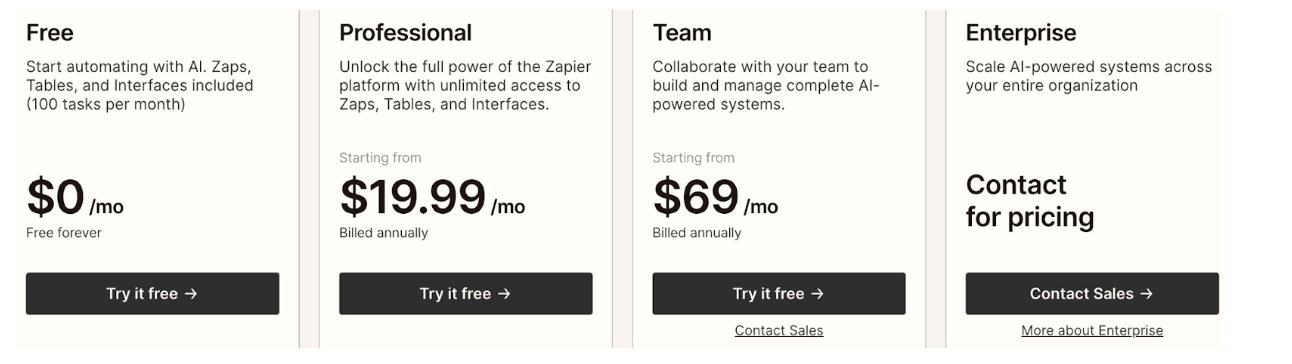
When selecting a Zapier plan, it is important to look beyond just task volume and consider the "Logic Barrier," as the Free plan is limited to simple connections while the Professional tier is required for Multi-step Zaps, such as simultaneously saving a lead to a CRM and sending a welcome email.
This upgrade also introduces essential advanced tools like Filters and Paths for creating intelligent, conditional workflows. Furthermore, the "Speed Factor" is a critical differentiator; while the Free plan only checks for new data every 15 minutes, the Professional and higher tiers drop this interval to 2 minutes or even 1 minute, which is non-negotiable for businesses prioritizing "Speed to Lead."
Finally, the Team plan addresses "Team Dynamics" by offering Shared App Connections and enhanced security, ensuring that multiple collaborators can build workflows safely without sharing passwords or risking system collapse if an employee departs. To ensure your team follows best practices, consider investing in automation training & support.
| Plan | Best For | Key Features |
|---|---|---|
Free | Testing basics | 100 tasks/mo, Single-step Zaps |
Professional ($19.99/mo) | Power users | Multi-step Zaps, Filters, Paths, 2-min updates |
Team ($69/mo) | Collaboration | Shared folders, Unlimited users, Admin controls |
Scaling Beyond the Basics with Flowlyn
While Zapier is incredibly user-friendly, complex business ecosystems often require more than a simple "if this, then that" connection. As your business grows, you may find yourself needing advanced error handling, custom API integrations, or AI-driven lead scoring that goes beyond standard Zaps.
At Flowlyn, we act as your expert automation partners. We specialize in building enterprise-grade Zapier automation services that integrate your entire tech stack. Our team helps you:
- Audit your current workflows to find "hidden" time leaks.
- Build complex, multi-path Zaps that handle your unique business logic.
- Integrate AI agents to qualify leads and handle customer inquiries 24/7.
Whether you need a custom CRM workflow or a complete automation strategy, we ensure your systems are robust and scalable. Discover our full range of solutions and see how we’ve helped clients save dozens of hours every week.
The shift from manual effort to automated precision is no longer a luxury reserved for tech giants; it is a fundamental requirement for any business that wants to remain competitive in 2026. Whether you are leveraging the visual complexity of Make, the user-friendly accessibility of Zapier, or the specialized intelligence of Conversational AI, the goal remains the same: reclaiming your time to focus on high-value strategy.

About Divyesh Savaliya
Divyesh leads Flowlyn with 12+ years of experience designing AI-driven automation systems for global teams.
In This Article