Back to Blog
Automation
Tutorial to Build a LinkedIn Leads Scraper Using N8n
Build a $0 LinkedIn lead scraper with n8n automation. Extract profiles from Google search and generate B2B leads without the LinkedIn API. Start now!
March 19, 2026
5 min read

Traditional LinkedIn scraping is a minefield. If you’ve ever tried to use a browser-based extension or a cloud scraper that interacts directly with LinkedIn’s interface, you’ve likely hit the LinkedIn Authwall.
LinkedIn’s security systems are aggressive; they detect automated behavior, trigger CAPTCHA, and frequently result in permanent account bans.
The secret isn't to scrape LinkedIn, it's to scrape Google's index of LinkedIn.
By using n8n and the Google Custom Search API, you can bypass the Authwall entirely and extract public profile data at zero cost.
Why Use n8n for LinkedIn Lead Generation?
n8n is a powerful workflow automation tool that allows you to connect different apps and APIs without the high costs of platforms like Zapier. When it comes to lead generation, n8n offers a level of control that off-the-shelf scrapers lack.
Manual prospecting involves searching for a keyword, clicking a profile, and copy-pasting details into a spreadsheet. It is slow and unscalable. An n8n workflow handles the heavy lifting, executing searches and processing hundreds of profiles while you focus on closing deals.
Most specialized LinkedIn scrapers charge $50 to $200 per month. By building your own tool in n8n, you leverage:
- Google’s Free Tier: Provides up to 100 searches per day for free.
- Self-hosted n8n: Costs nothing but your server fees. If you're looking for stability, check out the best servers to host n8n to keep your scraper running 24/7.
- No API Fees: Since you aren't hitting the LinkedIn API, there are no "credits" to buy.
Need a Custom Automation Strategy?
Book a strategic consultation with Flowlyn to build scalable lead generation engines.
Book Free CallLinkedIn Scraper Workflow for N8n
Scraping LinkedIn’s internal UI violates their Terms of Service and puts your account at risk. However, scraping Google’s search results is a different story. You are accessing publicly indexed data that Google has already crawled. This method is account-safe because you never actually log into LinkedIn during the extraction process.
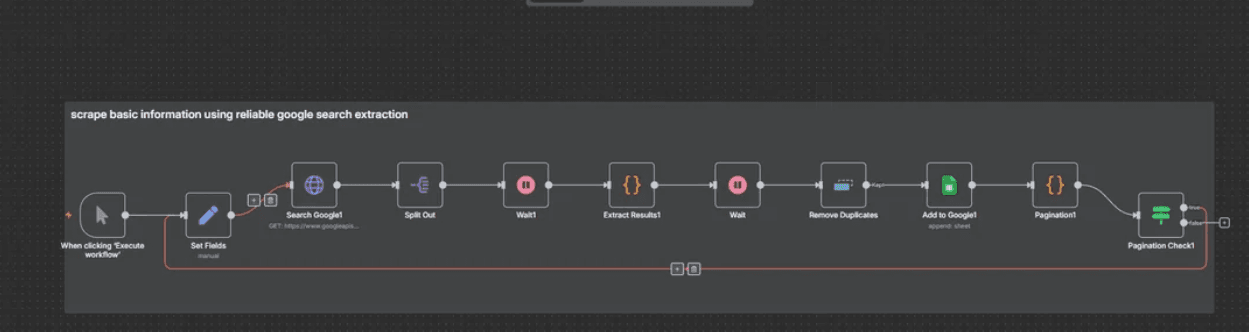
Credits: This workflow was shared by Ok_Day4337 on Reddit.
Here’s how it works:
- Takes a search query (e.g., "Co-founder in San Francisco site:linkedin.com/in/").
- Scrapes Google search results reliably.
- Extracts key information: First Name, Last Name, Title, Bio, and the direct LinkedIn profile URL.
- Cleans and removes duplicate entries.
- Handles pagination to go through multiple pages of results automatically.
- Appends everything neatly into a Google Sheet
To get the LinkedIn scraper workflow, copy the following JSON:
json
{
  "name": "Linkedin mass scraper #1",
  "nodes": [
    {
      "parameters": {
        "url": "https://www.googleapis.com/customsearch/v1",
        "sendQuery": true,
        "queryParameters": {
          "parameters": [
            {
              "name": "key",
              "value": "YOUR_API_KEY"
            },
            {
              "name": "cx",
              "value": "YOUR_CSE_ID"
            },
            {
              "name": "q",
              "value": "={{$node[\"Set Fields\"].json.baseQuery}} {{Number($node[\"Set Fields\"].json.queryIndex)}}"
            },
            {
              "name": "start",
              "value": "1"
            }
          ]
        },
        "sendHeaders": true,
        "headerParameters": {
          "parameters": [
            {}
          ]
        },
        "options": {}
      },
      "type": "n8n-nodes-base.httpRequest",
      "typeVersion": 4.2,
      "position": [
        2448,
        -288
      ],
      "id": "cbfc5f50-0a23-4112-9f9a-8766fc23a869",
      "name": "Search Google1"
    },
    {
      "parameters": {
        "jsCode": "// Get all incoming items. The previous node sends each search result as a separate item.
const incomingItems = $items();

// --- STATE PRESERVATION ---
// Get 'currentPage' for pagination. It might not be on every item,
// so we'll try to get it from the first one and default to 1 if missing.
const currentPage = $input.first().json.currentPage || 1;

// --- PROCESSING RESULTS ---
// Process each incoming item. 'n8nItem' is the wrapper object from n8n,
// and 'n8nItem.json' contains the actual data for one search result.
const results = incomingItems.map(n8nItem => {
  const item = n8nItem.json; // This is the search result object you want to process

  // Safely get metatags; defaults to an empty object if missing.
  const metatags = item.pagemap?.metatags?.[0] || {};

  // --- Primary Data Extraction (from Metatags) ---
  const firstName = metatags['profile:first_name'];
  const lastName = metatags['profile:last_name'];
  const description = metatags['og:description'];
  const rawTitle = metatags['og:title'] || item.title || '';
  const cleanedTitle = rawTitle.replace(/\\| LinkedIn/gi, '').trim();

  // --- Fallback Data Extraction (from standard fields) ---
  const titleParts = cleanedTitle.split(' - ');
  const fullNameFromTitle = titleParts[0]?.trim();
  const nameParts = fullNameFromTitle?.split(' ') || [];

  const guessedFirstName = nameParts[0];
  const guessedLastName = nameParts.slice(1).join(' ');
  const professionalTitle = titleParts.slice(1).join(' - ').trim();

  // --- Final Output Object ---
  // Prioritizes metatag data but uses guessed fallbacks if necessary.
  return {
    firstname: firstName || guessedFirstName || null,
    lastname: lastName || guessedLastName || null,
    description: description || item.snippet || null,
    location: metatags.locale || null,
    title: professionalTitle || fullNameFromTitle || null,
    linkedinUrl: item.formattedUrl || item.link || null,
    currentPage: currentPage // Always include the current page for state tracking
  };
});

// Return the final processed results in the correct n8n format.
return results.map(r => ({ json: r }));

"
      },
      "type": "n8n-nodes-base.code",
      "typeVersion": 2,
      "position": [
        3120,
        -288
      ],
      "id": "8e7d5dc1-a6de-441b-b319-29f1be26a644",
      "name": "Extract Results1"
    },
    {
      "parameters": {
        "operation": "append",
        "documentId": {
          "__rl": true,
          "value": "YOUR_GOOGLE_SHEET_ID",
          "mode": "list",
          "cachedResultName": "leads",
          "cachedResultUrl": "https://docs.google.com/spreadsheets/d/YOUR_GOOGLE_SHEET_ID/edit?usp=drivesdk"
        },
        "sheetName": {
          "__rl": true,
          "value": 1532290307,
          "mode": "list",
          "cachedResultName": "Sheet10",
          "cachedResultUrl": "https://docs.google.com/spreadsheets/d/YOUR_GOOGLE_SHEET_ID/edit#gid=1532290307"
        },
        "columns": {
          "mappingMode": "defineBelow",
          "value": {
            "First name ": "={{ $json.firstname }}",
            "Last name": "={{ $json.lastname }}",
            "bio": "={{ $json.description }}",
            "location": "={{ $json.location }}",
            "linkedin_url": "={{ $json.linkedinUrl }}",
            "title ": "={{ $json.title }}"
          },
          "matchingColumns": [],
          "schema": [
            {
              "id": "First name ",
              "displayName": "First name ",
              "required": false,
              "defaultMatch": false,
              "display": true,
              "type": "string",
              "canBeUsedToMatch": true
            },
            {
              "id": "Last name",
              "displayName": "Last name",
              "required": false,
              "defaultMatch": false,
              "display": true,
              "type": "string",
              "canBeUsedToMatch": true
            },
            {
              "id": "bio",
              "displayName": "bio",
              "required": false,
              "defaultMatch": false,
              "display": true,
              "type": "string",
              "canBeUsedToMatch": true
            },
            {
              "id": "title ",
              "displayName": "title ",
              "required": false,
              "defaultMatch": false,
              "display": true,
              "type": "string",
              "canBeUsedToMatch": true
            },
            {
              "id": "linkedin_url",
              "displayName": "linkedin_url",
              "required": false,
              "defaultMatch": false,
              "display": true,
              "type": "string",
              "canBeUsedToMatch": true
            },
            {
              "id": "location",
              "displayName": "location",
              "required": false,
              "defaultMatch": false,
              "display": true,
              "type": "string",
              "canBeUsedToMatch": true
            }
          ],
          "attemptToConvertTypes": false,
          "convertFieldsToString": false
        },
        "options": {}
      },
      "type": "n8n-nodes-base.googleSheets",
      "typeVersion": 4.5,
      "position": [
        3792,
        -288
      ],
      "id": "ce9d37a0-7af7-4239-9a54-b4034cda56dc",
      "name": "Add to Google1",
      "credentials": {
        "googleSheetsOAuth2Api": {
          "id": "YOUR_CREDENTIAL_ID",
          "name": "Google Sheets account"
        }
      }
    },
    {
      "parameters": {
        "jsCode": "const currentPage = $runIndex + 1;

// Get the maxPages variable from the Set Fields1 node.
const maxPages = $('Set Fields').first().json.maxPages

// Get the response from the previous Search Google node.
const lastResult = $('Search Google1').first().json;

// The Google Custom Search API returns a 'nextPage' object if there are more results.
// If this object is not present, it means we have reached the end of the results for this query.
const hasNextPage = lastResult.queries.nextPage ? true : false;

// The loop should continue only if there is a next page AND we haven't hit the max page limit.
const continueLoop = hasNextPage && currentPage < maxPages;

// The startIndex for the next search is what the API provides in its response.
const startIndex = lastResult.queries.nextPage ? lastResult.queries.nextPage[0].startIndex : null;

return {
  json: {
    continueLoop,
    startIndex,
    currentPage
  }
};"
      },
      "type": "n8n-nodes-base.code",
      "typeVersion": 2,
      "position": [
        4016,
        -288
      ],
      "id": "5e282e73-8af1-4e70-ba28-433162178c9c",
      "name": "Pagination1"
    },
    {
      "parameters": {
        "conditions": {
          "options": {
            "caseSensitive": true,
            "leftValue": "",
            "typeValidation": "strict",
            "version": 2
          },
          "conditions": [
            {
              "id": "faef2862-80a4-465b-9e0b-be5b9753dcbd",
              "leftValue": "={{ $json.continueLoop }}",
              "rightValue": "true",
              "operator": {
                "type": "boolean",
                "operation": "true",
                "singleValue": true
              }
            }
          ],
          "combinator": "and"
        },
        "options": {}
      },
      "type": "n8n-nodes-base.if",
      "typeVersion": 2.2,
      "position": [
        4240,
        -216
      ],
      "id": "2004d720-1470-4f67-8893-aa3d47485c69",
      "name": "Pagination Check1"
    },
    {
      "parameters": {
        "fieldToSplitOut": "items",
        "options": {}
      },
      "type": "n8n-nodes-base.splitOut",
      "typeVersion": 1,
      "position": [
        2672,
        -288
      ],
      "id": "f48d883b-d732-464d-a130-c452f5a3e06a",
      "name": "Split Out"
    },
    {
      "parameters": {
        "assignments": {
          "assignments": [
            {
              "id": "cc27b2d9-8de7-43ca-a741-2d150084f78e",
              "name": "currentStartIndex",
              "value": "={{$runIndex === 0 ? 1 : $node[\"Pagination1\"].json.startIndex}}

",
              "type": "number"
            },
            {
              "id": "fc552c57-4510-4f04-aa09-2294306d0d9f",
              "name": "maxPages",
              "value": 30,
              "type": "number"
            },
            {
              "id": "0a6da0df-e0b8-4c1d-96fb-4eea4a95c0b9",
              "name": "queryIndex",
              "value": "={{$runIndex === 0 ? 1 : $node[\"Pagination1\"].json.currentPage + 1}}",
              "type": "number"
            },
            {
              "id": "f230884b-2631-4639-b1ea-237353036d34",
              "name": "baseQuery",
              "value": "web 3 crypto vc  site:linkedin.com/in",
              "type": "string"
            }
          ]
        },
        "options": {}
      },
      "type": "n8n-nodes-base.set",
      "typeVersion": 3.4,
      "position": [
        2224,
        -216
      ],
      "id": "e5f1753e-bfd3-44a9-be2a-46360b73f81f",
      "name": "Set Fields"
    },
    {
      "parameters": {
        "amount": 3
      },
      "type": "n8n-nodes-base.wait",
      "typeVersion": 1.1,
      "position": [
        3344,
        -288
      ],
      "id": "ccfb9edc-796f-4e25-bf26-c96df7e3698f",
      "name": "Wait",
      "webhookId": "faeaa137-ae39-4b73-be84-d65e3df9ccb0"
    },
    {
      "parameters": {},
      "type": "n8n-nodes-base.wait",
      "typeVersion": 1.1,
      "position": [
        2896,
        -288
      ],
      "id": "febefbdb-266a-4f37-a061-22a7e8ef8f4a",
      "name": "Wait1",
      "webhookId": "e85bbc2d-5975-4d50-a4d2-f5b619ea2a7e"
    },
    {
      "parameters": {},
      "type": "n8n-nodes-base.manualTrigger",
      "typeVersion": 1,
      "position": [
        2000,
        -216
      ],
      "id": "effc048b-9391-44f4-9695-411e7fb9995c",
      "name": "When clicking ‘Execute workflow’"
    },
    {
      "parameters": {
        "operation": "removeItemsSeenInPreviousExecutions",
        "dedupeValue": "={{ $json.linkedinUrl }}",
        "options": {}
      },
      "type": "n8n-nodes-base.removeDuplicates",
      "typeVersion": 2,
      "position": [
        3568,
        -288
      ],
      "id": "c71ca4e2-a16a-4bd3-b5d4-3c664dc85a67",
      "name": "Remove Duplicates"
    }
  ],
  "pinData": {},
  "connections": {
    "Search Google1": {
      "main": [
        [
          {
            "node": "Split Out",
            "type": "main",
            "index": 0
          }
        ]
      ]
    },
    "Extract Results1": {
      "main": [
        [
          {
            "node": "Wait",
            "type": "main",
            "index": 0
          }
        ]
      ]
    },
    "Add to Google1": {
      "main": [
        [
          {
            "node": "Pagination1",
            "type": "main",
            "index": 0
          }
        ]
      ]
    },
    "Pagination1": {
      "main": [
        [
          {
            "node": "Pagination Check1",
            "type": "main",
            "index": 0
          }
        ]
      ]
    },
    "Pagination Check1": {
      "main": [
        [
          {
            "node": "Set Fields",
            "type": "main",
            "index": 0
          }
        ],
        []
      ]
    },
    "Split Out": {
      "main": [
        [
          {
            "node": "Wait1",
            "type": "main",
            "index": 0
          }
        ]
      ]
    },
    "Set Fields": {
      "main": [
        [
          {
            "node": "Search Google1",
            "type": "main",
            "index": 0
          }
        ]
      ]
    },
    "Wait": {
      "main": [
        [
          {
            "node": "Remove Duplicates",
            "type": "main",
            "index": 0
          }
        ]
      ]
    },
    "Wait1": {
      "main": [
        [
          {
            "node": "Extract Results1",
            "type": "main",
            "index": 0
          }
        ]
      ]
    },
    "When clicking ‘Execute workflow’": {
      "main": [
        [
          {
            "node": "Set Fields",
            "type": "main",
            "index": 0
          }
        ]
      ]
    },
    "Remove Duplicates": {
      "main": [
        [
          {
            "node": "Add to Google1",
            "type": "main",
            "index": 0
          }
        ]
      ]
    }
  },
  "active": false,
  "settings": {
    "executionOrder": "v1"
  },
  "versionId": "af7362c2-1797-4de9-a180-b6cf0f1b2ef6",
  "meta": {
    "templateCredsSetupCompleted": true,
    "instanceId": "YOUR_INSTANCE_ID"
  },
  "id": "07oKZSqud3sTU0gy",
  "tags": [
    {
      "createdAt": "2025-09-07T11:35:16.451Z",
      "updatedAt": "2025-09-07T11:35:16.451Z",
      "id": "M4AitXE92Ja8S78A",
      "name": "youtube"
    }
  ]
}
Then, create a new workflow in n8n and use CTRL + V to paste the workflow.
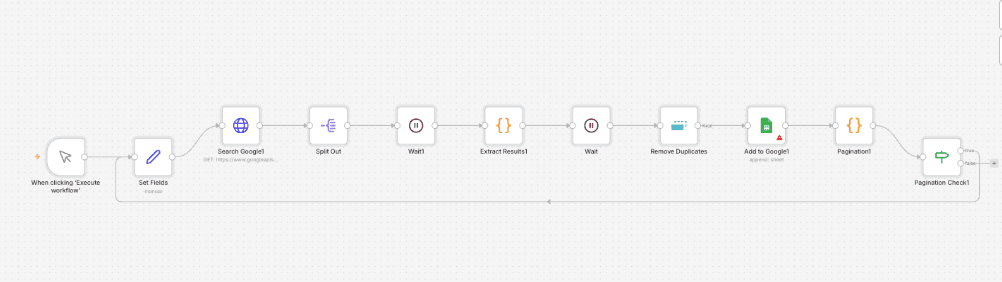
In the Search Google node, replace the API key with that you got from your Google account and also connect a sheet in the Google Sheets node.
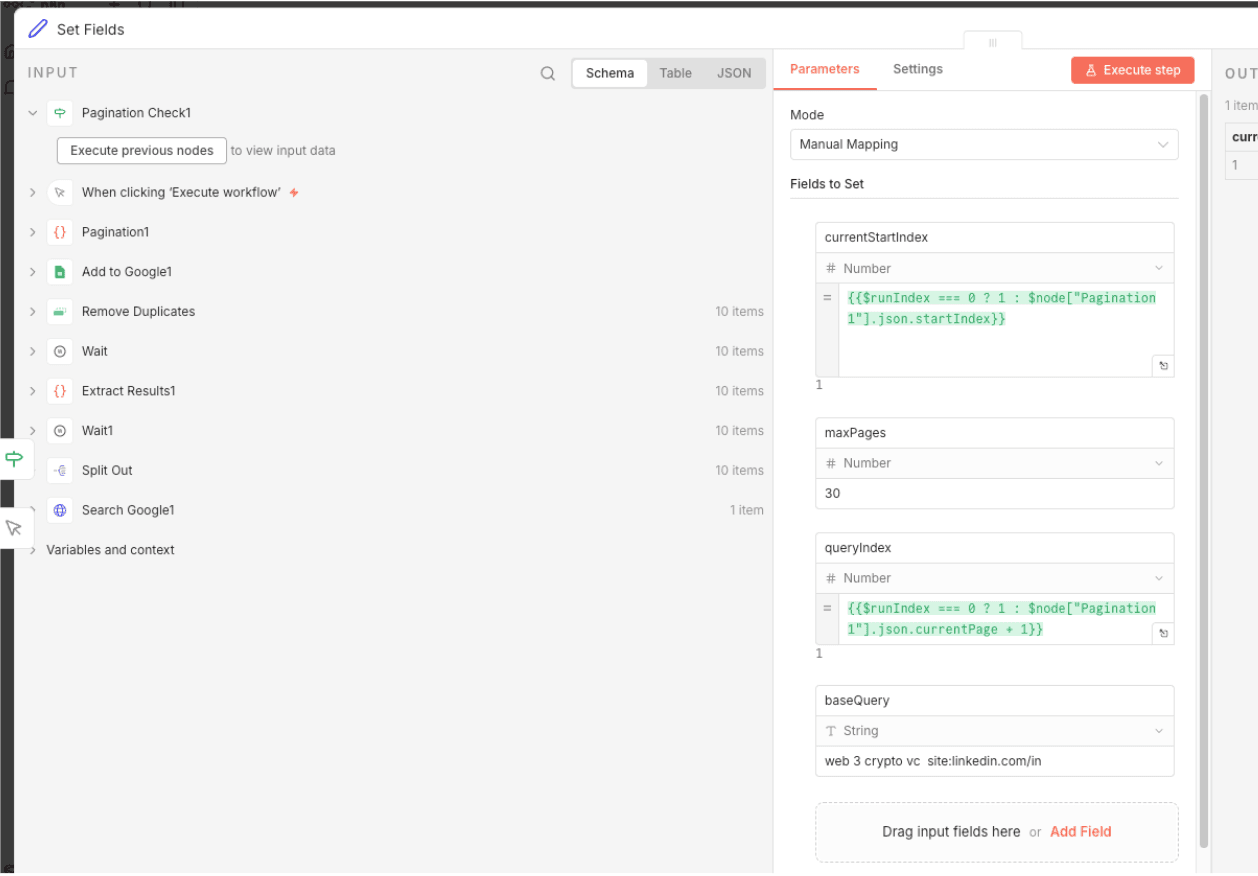
Once you’re done with the configuration, you can use the Set Fields node to define the query to target for scraping. In this example, we have added “web 3 crypto vc site:linkedin.com”. This will pull all information of web 3 crypto vc related LinkedIn profiles from Google Search and scrape its data like Name, Bio, etc. into the Sheets.
Implementing Advanced Features (The Pro Tips)
To make this a truly professional-grade tool, you need to handle the nuances of web automation.
Handling Pagination
Google returns results in batches of 10. To scrape 100 leads, you need to loop the workflow. In n8n, you can use a Wait Node and an If Node to check if you have reached your target count. Each loop should increment the start parameter in the Google API request (e.g., start=1, then start=11, etc.).
Rate Limiting
Google is more relaxed than LinkedIn, but hitting their API too fast might still trigger a temporary block. Place a Wait Node set to 2 to 5 seconds between each API call to mimic human-like pacing.
Lead Enrichment
The data you get from Google is great, but it lacks an email address. You can extend this workflow by adding a node at the end that sends the Name and Company to an enrichment tool like Hunter.io or Apify. This turns a simple profile URL into a reachable cold outbound lead.
Troubleshooting Common Issues
The most common issues here are "No results found" and "API Limit reached."
If the workflow returns zero items, your Google Dorking query might be too restrictive. Try removing one of the quoted keywords or check if your Search Engine ID is correctly restricted to linkedin.com/in.
If you are on the free tier, you only get 100 searches per day. If you need more, you can either upgrade your Google Cloud billing or set up multiple Search Engines/API keys and rotate them within n8n. Building a LinkedIn scraper with n8n is the smartest way to generate B2B leads. It protects your account, costs almost nothing, and is infinitely customizable. By focusing on Google’s public index, you side-step the technical hurdles that break most other scrapers and build a sustainable lead machine.
Ready to Automate Lead Gen?
Let Flowlyn build an advanced lead generation system tailored to your business needs.
Book Free Call
About Divyesh Savaliya
Divyesh leads Flowlyn with 12+ years of experience designing AI-driven automation systems for global teams.
In This Article
![Real Estate Chatbot - Benefits & Use Cases [Examples]](/_next/image?url=%2Fimages%2Fblog%2Freal-estate-chatbot%2Freal-estate-chatbot-benefix-use-cases.webp&w=3840&q=75)