Back to Blog
Automation
How to Connect N8n to Shopify?
Learn how to connect N8n to Shopify to automate orders, customers, and product workflows using APIs and webhooks. A simple step-by-step integration guide.
March 20, 2026
6 min read

For e-commerce owners, time is the most valuable currency. As your Shopify store grows, the manual workload grows with it, managing orders, updating inventory, tagging customers, and handling refunds can quickly become a full-time job that keeps you away from high-level strategy.
The manual way of running a store doesn't scale. You can't be expected to manually email every high-value customer or update a spreadsheet every time a product sells out. This is where n8n comes in. By connecting n8n to Shopify, you can build a custom brain for your store that handles the repetitive tasks for you. This guide provides a detailed roadmap on how to bridge these two platforms to turn your shop into a self-running automation powerhouse.
Prerequisites: What You Need to Start
Before you start building workflows, ensure you have the following pieces of the puzzle ready:
- A Shopify Store: This works with Shopify Basic, Shopify, or Advanced plans. As long as you have access to the admin backend, you can initiate a connection.
- An n8n Instance: You can use the official n8n Cloud for a quick start, but many e-commerce brands prefer a self-hosted instance (on a server like DigitalOcean) for better control over data and lower long-term costs.
- Admin Access: To connect an external tool like n8n, you must have the Develop Apps permission. If you aren't the store owner, you'll need the owner to grant you these permissions under the Users and Permissions settings.
Step-by-Step: How to Connect n8n to Shopify
To connect n8n to Shopify, we use a Custom App. Shopify no longer allows simple API Key access for security reasons. Instead, you create a private app within your own store that acts as a secure doorway for n8n to enter and perform actions on your behalf.
Creating Your Shopify Custom App
Step 1: Accessing App Development
Log into your Shopify Admin. Navigate to Settings > Apps and sales channels. Click on the Develop apps button at the top, and then click Create an app. Give it a clear name, such as n8n Automation, so you know exactly what this app is for later.
Step 2: Defining API Scopes
This is the most critical technical step. API Scopes are essentially permissions. You need to tell Shopify exactly what n8n is allowed to see and do.
- If you want to automate orders, you must check read_orders and write_orders.
- If you want to manage inventory, check read_products and write_products.
Step 3: Generating the Admin API Access Token
Once you’ve selected your scopes, click Install App. Shopify will then reveal your Admin API Access Token.
Warning: You can only see this token once. Copy it immediately and store it in a secure password manager. If you lose it, you will have to uninstall the app and start over.
Configuring the Shopify Node in n8n
Now that you have your credentials, it's time to plug them into n8n.
Step 1: The Credential Setup
Open your n8n instance and add a Shopify Node. Click on "Create New Credentials."
- Shop Name: Enter your Shopify subdomain only. For example, if your store is cool-gear-2026.myshopify.com, you only enter cool-gear-2026.
- Access Token: Paste the Admin API Access Token you copied from Step 3 above.
Step 2: Testing the Connection
To ensure the bridge is working, set the Resource to Product and the Operation to Get All. Hit Execute Node. If you see a list of your products appear in the output window, your connection is successful.
Step 3: Handling Webhooks
While the Shopify Node is great for doing things, the Shopify Trigger Node is used for reacting to things. Webhooks allow Shopify to ping n8n the exact millisecond a new order is placed or a customer is created. This ensures your automations happen in real-time, rather than waiting for a scheduled check.
Need a Custom Automation Strategy?
Book a strategic consultation with Flowlyn to streamline your Shopify workflows.
Book Free CallTop 5 Shopify n8n Automation Workflows
Once connected, you can start building. Here are five high-impact workflows that our clients frequently implement to save hours of manual labor.
1. The "Gold Customer" Alert
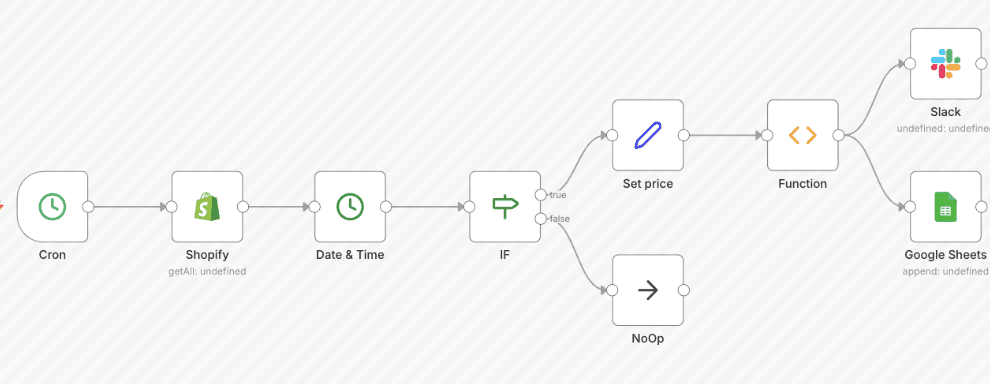
High-value orders deserve high-value attention. You can set up a workflow that triggers on a New Order. n8n checks the total price; if it’s over $500, it instantly sends a notification to your team's Slack or Microsoft Teams channel. This allows your support or sales team to reach out with a personal "thank you," building massive brand loyalty.
2. Automated Inventory Management
Stockouts are the silent killers of e-commerce. You can create an n8n workflow that monitors your inventory levels. Every time a product's stock drops below 10 units, n8n can update a Google Sheet or send an email to your purchasing manager. This ensures you never run out of your best-sellers.
3. Smart Order Routing
If you use multiple warehouses or a third-party logistics (3PL) provider, you can automate your routing logic. For example, if an order contains a specific tag (like "Heavy" or "Fragile"), n8n can automatically detect this and send a custom fulfillment request to your 3PL via Email or API, bypassing the standard Shopify flow.
4. Review Request Delay
Timing is everything for reviews. You don't want to ask for a review before the customer has opened the box. You can build a workflow that waits exactly 7 days after an order is marked as Fulfilled in Shopify. Then, n8n can trigger a personalized WhatsApp message or a Klaviyo email requesting a review. This ensures the request hits the customer's inbox right when their excitement is at its peak.
5. Refund Tracking
Refunds provide vital data on product quality. You can set n8n to watch for New Refund events. It can then automatically log the Refund Amount and the Reason for Return into a centralized Airtable or SQL database. This allows you to generate monthly reports to see if a specific product has a recurring defect.
Create Your Automated Workflow Today
The true power of Shopify lies in its extensibility. By moving your operations into n8n, you aren't just using an app, you are building a custom operating system for your business. This flexibility is a core part of a successful Shopify workflow automation strategy, allowing you to bridge the gap between your store and hundreds of other tools like CRM, ERP, and AI agents.
As you scale, the complexity of these workflows will increase. You'll need to handle API rate limits, deduplication, and complex data mapping to ensure your store remains stable. If you want to skip the learning curve and have a professional, hardened automation system built for your brand, we can help.
At Flowlyn, we specialize in high-performance n8n integrations that turn manual e-commerce tasks into silent, reliable background processes. Explore our custom n8n workflow services and let’s build a store that grows even while you sleep.
Ready to Automate Shopify?
Book a strategic consultation with Flowlyn and let us automate your store today.
Book Free Call
About Divyesh Savaliya
Divyesh leads Flowlyn with 12+ years of experience designing AI-driven automation systems for global teams.
In This Article