Back to Blog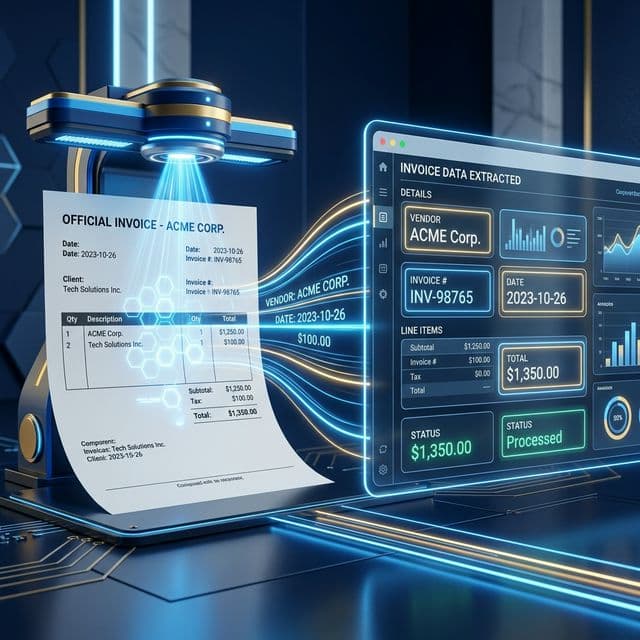
Automation
Using N8n to Automate Invoice Processing with AI
Learn how to automate invoice processing using N8n and AI. Extract data from invoices, validate details, and store or process them with powerful workflows.
March 20, 2026
6 min read

Manual invoice processing is a notorious bottleneck for growing businesses. It usually involves a team member sitting at a desk, opening dozens of emails, downloading PDFs, and manually typing data into an ERP or accounting software. It is slow, prone to human error, and expensive to scale.
By combining n8n with modern AI models, you can transform this manual chore into a fully autonomous system. Instead of data entry, your team moves into an approval role, only intervening when the AI flags a discrepancy. This guide walks you through building a professional-grade invoice automation engine.
The Tech Stack: What You’ll Need
To build an automated pipeline, you need a combination of an orchestrator, an input source, a brain, and a destination.
n8n: The Orchestrator
n8n is the glue that holds everything together. It handles the logic, grabbing the file, sending it to the AI, and routing the data based on whether it's a valid invoice or a duplicate.
Triggers: The Source of Data
You need a way for invoices to enter the system. Common triggers include:
- Gmail/Outlook: Automatically monitor an inbox (e.g., billing@yourcompany.com) for attachments.
- Google Drive/Dropbox: Watch a specific folder where team members drop scanned receipts.
The AI Brain: Optical Character Recognition (OCR) + LLM
Traditional OCR often fails because every vendor uses a different invoice layout. By using OpenAI (GPT-4o) or Anthropic (Claude), the system doesn't just see text; it understands it. It knows that Due Date and Pay By mean the same thing, regardless of where they are on the page.
The Destination: Your Accounting Suite
Once the data is extracted, n8n pushes it into your financial ecosystem. This could be QuickBooks, Xero, or even a Google Sheet for internal tracking before it hits the official books.
Want to automate your finances?
Book a strategic consultation with Flowlyn to implement automated invoice processing in your business.
Book Free CallStep-by-Step Workflow Breakdown
Building an invoice bot requires a few critical nodes to ensure data flows correctly without getting lost or corrupted.
Step 1: Set the Trigger
Start with a Gmail Trigger node. Configure it to look for emails with attachments that end in .pdf or .jpg. You can add filters to only process emails containing the keyword Invoice to avoid wasting AI credits on newsletters or generic correspondence.
Step 2: Binary Data Handling
In n8n, files are treated as Binary Data. Before the AI can read the invoice, you need to ensure the file is properly passed through the workflow. If you are using a tool like AWS Textract, you send the binary file directly. If you are using GPT-4o-vision, n8n will convert that binary data into a format the model can see.
Step 3: The AI Node
This is the heart of the operation. You’ll use an AI Agent node or a Chain node.
- The Prompt: Extract the following data into JSON format: Vendor Name, Total Amount, Currency, Tax Amount, Invoice Number, and Due Date.
- The Model: GPT-4o is excellent at this because it can visually parse the layout of the document to find hidden details like small-print tax IDs.
Step 4: Approval Gate
Automation should never be 100% blind when money is involved. Insert a Wait for Webhook node or a simple IF Node. If the AI's Confidence Score is below 0.9, or if the total amount exceeds a certain threshold (e.g., $1,000), n8n can send a Slack message with an Approve or Reject button.
Step 5: Final Export
Once approved, the data is sent to your accounting software. The QuickBooks Node in n8n allows you to create a Bill automatically. This ensures that by the time you sit down to do your weekly accounts, every invoice is already staged and ready for payment.
Why This Workflow Beats Manual Entry
Once the invoice is processed, you can round out your financial stack by employing an AI bank reconciliation workflow to trace that exact invoice back to the actual bank payment.
Switching to an AI-driven n8n workflow provides immediate ROI by shifting your team's focus from low-value tasks to high-value analysis.
- Unmatched Speed: While a human might take 2–3 minutes to process a single complex invoice, n8n can process 100 invoices in seconds.
- Seamless Scalability: Your business can double its volume of monthly bills without you needing to hire additional administrative staff. The workflow costs the same whether it processes 10 or 1,000 documents.
- Global Precision: AI handles international business with ease. It can read and translate invoices in different languages and automatically convert dozens of currencies into your base currency using a live exchange rate API.
Understanding n8n workflow automation fundamentals is essential to making these steps work in harmony. Once you master the basics of how nodes pass data, adding AI complexity becomes much more intuitive.
Enhance Your AI Workflows
Book a strategic consultation with Flowlyn to integrate advanced automation solutions into your pipeline.
Book Free CallPro Tips for Error-Free Automation
To make your system bulletproof, you need to account for the messy reality of business documents.
Fallback Logic
What happens if someone sends a blurry photo of a receipt? Use an IF Node to check if the AI returned empty fields. If it did, set a path that moves the file to a Manual Review folder and notifies the team.
Deduplication
Paying the same bill twice is a nightmare. Before creating a bill in your accounting software, have n8n search your database for the Vendor Name + Invoice Number. If a match exists, stop the workflow and flag it as a potential duplicate.
Secure Hosting
Financial data is sensitive. While n8n Cloud is secure, many firms prefer self-hosting to ensure their vendor data never leaves their private infrastructure. Hosting your instance on a dedicated server gives you full control over data encryption and access logs.
Create a Custom Workflow
Automating your finances is one of the highest-leverage moves you can make as a business owner. It eliminates the paperwork drag that slows down growth and ensures your records are always up to date.
Building a secure, AI-powered invoice system requires a deep understanding of both financial security and n8n's technical architecture. If you're ready to stop manual data entry and want a professional, hardened solution tailored to your specific accounting stack, we can help. Explore our custom n8n workflow services to get your automation journey started today.
Ready to Save Time on Invoicing?
Book a strategic consultation with Flowlyn and let us automate your accounting today.
Book Free Call
About Divyesh Savaliya
Divyesh leads Flowlyn with 12+ years of experience designing AI-driven automation systems for global teams.
In This Article