Back to Blog
Automation
AI Bank Reconciliation: Guide to Automated Finance
Automate your financial workflows with AI bank reconciliation. Learn to match transactions and detect discrepancies efficiently. Start streamlining today!
March 20, 2026
6 min read

For most finance teams, bank reconciliation is a recurring headache. It is the tedious process of ensuring that every penny leaving or entering the bank account perfectly matches the records in the internal ledger. When you are dealing with hundreds or thousands of transactions, manual reconciliation isn't just slow; it's a risk. A single typo or a missed decimal point can lead to weeks of forensic accounting later.
AI bank reconciliation changes the game. By moving away from rigid, rule-based software and toward intelligent, agentic workflows, businesses can automate the matching process with near-perfect accuracy. This guide explores how AI is revolutionizing the back office and how you can build your own reconciliation agent.
How AI Bank Reconciliation Works (The Logic)
Traditional reconciliation software works on Exact Match logic. If your bank statement says $100.01 and your invoice says $100.00, the system breaks. AI, however, doesn't just look for a number; it looks for a story behind the data.
Fuzzy Matching
AI handles the messiness of real-world banking. A bank descriptor might show up as "SBUX 123" while your internal records show Starbucks Coffee. A human knows these are the same, but a traditional computer doesn't. AI uses fuzzy matching to identify these variations based on historical context and semantic similarity.
One-to-Many Matching
Often, a single bank deposit represents a bulk payment for multiple customer invoices. AI can analyze the total deposit amount and cross-reference it with outstanding invoices to find the exact combination of bills that add up to that specific deposit. It solves the puzzle that usually takes a human accountant hours to piece together.
Anomaly Detection
AI acts as a 24/7 auditor. It learns your company’s normal spending patterns. If a duplicate payment is made to a vendor, or if an unusual bank fee appears that doesn't fit historical patterns, the AI flags it instantly. It doesn't just match records; it protects your cash flow.
Need a Custom Automation Strategy?
Book a strategic consultation with Flowlyn to streamline your financial workflows.
Book Free Call5 Ways to Automate Bank Reconciliation with AI Agents
There is no one-size-fits-all approach to financial automation. Depending on your tech stack, you can implement AI reconciliation in several ways:
1. Direct API Integration
The cleanest method is connecting n8n directly to your bank (via Plaid or Salt Edge) and your accounting software (QuickBooks/Xero). The AI agent sits in the middle, pulling pending transactions from both sides and clearing them in real-time.
2. Intelligent OCR for PDFs
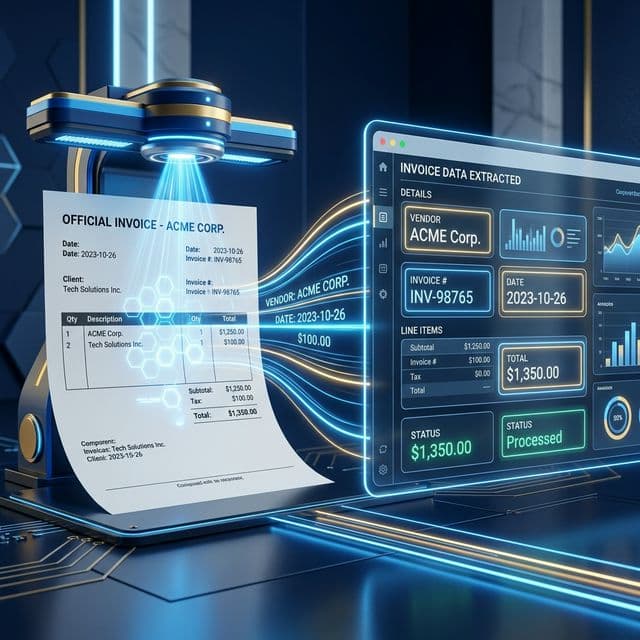
If your bank doesn't have a reliable API, or if you are dealing with paper-heavy vendors, you need Intelligent OCR. An AI agent can read a PDF bank statement, extract the transaction table, and convert it into a structured format for matching.
3. Automated Categorization Agent
Sometimes a transaction matches the amount but lacks a category (e.g., "Was this Office Supplies or Marketing?"). An AI agent looks at the vendor and the department of the person who made the purchase to automatically assign the correct General Ledger (GL) code.
4. Discrepancy Resolution Bot
When a match isn't found, instead of just failing, the agent can take action. It can search your email for a missing receipt or ping the relevant employee in Slack: "Hey, you spent $45 at 'Hardware Depot' but I can't find the invoice. Can you upload it here?"
5. Multi-Currency Reconciliation
For global businesses, AI is a lifesaver. It can pull live exchange rates from the exact moment of a transaction to reconcile a USD invoice against a EUR bank withdrawal, accounting for fluctuations and bank conversion fees automatically.
How to Build a Reconciliation Agent in n8n
Building a reconciliation engine requires a strategic architecture. You want a system that is robust but flexible.
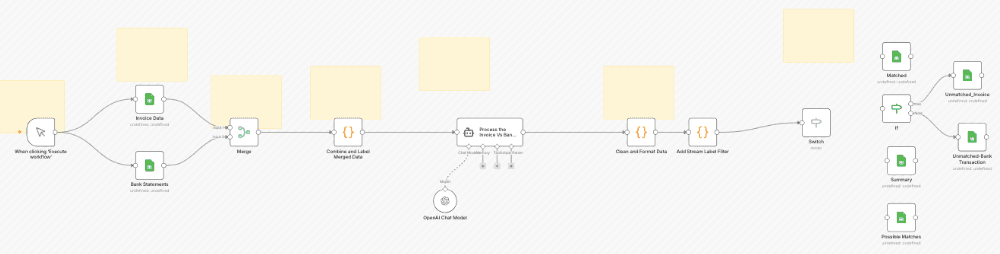
Step 1: The Ingestion
Your workflow starts by gathering data. Use a Schedule Trigger to pull the latest transaction list from your bank API and your accounting software's Unreconciled list at 2:00 AM every night.
Step 2: The Data Standardizer
Bank data is often messy. Use a Code Node or an AI Transform Node to clean the strings. This ensures that dates are in the same format (YYYY-MM-DD) and that all currency symbols are stripped, leaving only raw numbers.
Step 3: The AI Brain
This is where the matching happens. Pass both lists of data to an AI Agent Node. Give it instructions to find matches based on amount, date proximity, and vendor name. This node should output a list of Confident Matches and Potential Matches.
Step 4: The Decision Matrix
Use an IF Node or Switch Node.
- High Confidence: Automatically send a Reconcile command to your accounting API.
- Low Confidence: Push the data to a Google Sheet or a Slack channel for human review.
Step 5: The Audit Log
Transparency is key in finance. Every action the AI takes should be recorded in an audit log (PostgreSQL or a Sheet), noting why it made a specific match.
As you design this, it is vital to think long-term. Learning how to build a scalable automation strategy ensures that your reconciliation agent can handle a jump from 100 transactions to 10,000 without crashing your server or exceeding API limits.
Want to automate your finances?
Book a strategic consultation with Flowlyn to implement automated invoice processing in your business.
Book Free CallBenefits of Shifting to AI-Driven Workflows
Moving your reconciliation to an AI-driven model provides benefits that go far beyond just saving time.
- Reduced "Day to Close": Most companies take 10–15 days to close their monthly books. AI-driven firms can close in 1–2 days because the reconciliation is happening daily, not in a frantic rush at the end of the month.
- Fraud Prevention: By analyzing transactions in real-time, AI catches unusual patterns like small test withdrawals or vendor billing changes before they become significant losses.
- Unlimited Scalability: In a manual setup, more business means more accountants. With an n8n agent, you can process ten times the volume with the same effort, allowing your finance team to focus on strategy rather than spreadsheets.
Start Your Automation Today!
AI bank reconciliation is no longer a luxury reserved for Enterprise-level firms. With n8n, you can build a custom, secure, and highly accurate agent that acts as your most diligent junior accountant.
If you are ready to eliminate the monthly stress of manual reconciliation and want a system built to professional financial standards, our team is here to help. Explore our custom n8n workflow services and let’s turn your finance department into a high-speed automation engine.
Ready to Save Time on Reconciliation?
Book a strategic consultation with Flowlyn and let us automate your accounting today.
Book Free Call
About Divyesh Savaliya
Divyesh leads Flowlyn with 12+ years of experience designing AI-driven automation systems for global teams.
In This Article
![Real Estate Chatbot - Benefits & Use Cases [Examples]](/_next/image?url=%2Fimages%2Fblog%2Freal-estate-chatbot%2Freal-estate-chatbot-benefix-use-cases.webp&w=3840&q=75)