Back to Blog
Automation
We Built a Self-healing Openclaw-like Agent in N8n
Learn how we built a self-healing Openclaw-like AI agent using N8n. Discover how it detects failures, retries tasks, and keeps workflows running.
March 20, 2026
6 min read

In the world of automation, the greatest enemy isn't complexity; its fragility. Most workflows are brittle; they work perfectly until a website changes its layout, an API goes down for ten seconds, or an LLM returns a slightly malformed JSON response. When these inevitable glitches happen, traditional automation simply stops and waits for a human to fix it.
We decided to change that. Inspired by the resilience of projects like Openclaw, we built a self-healing AI agent entirely within n8n. This agent doesn't just execute tasks; it monitors its own performance, diagnoses its own failures, and rewrites its own logic on the fly to get the job done.
What is a "Self-Healing" Agent?
To understand why this is a massive leap forward, we have to look at how we’ve handled errors in the past.
Reactive Error Handling
Most n8n users are familiar with basic error handling. You set an Error Trigger that sends a Slack message or an email saying, Workflow X has failed. This is reactive. It notifies you of a problem, but the workflow remains broken until you log in and manually click Retry.
Self-Healing (The Agentic Way)
A self-healing agent is proactive. If a node fails, the agent doesn't just give up. It pauses and asks: "Why did this fail?" Was the JSON format incorrect? Did the CSS selector change on the target website? Did the API return a 429 Rate Limit error?
Instead of a generic alert, the agent analyzes the error code, modifies the prompt or the tool parameters, and tries again with a different strategy.
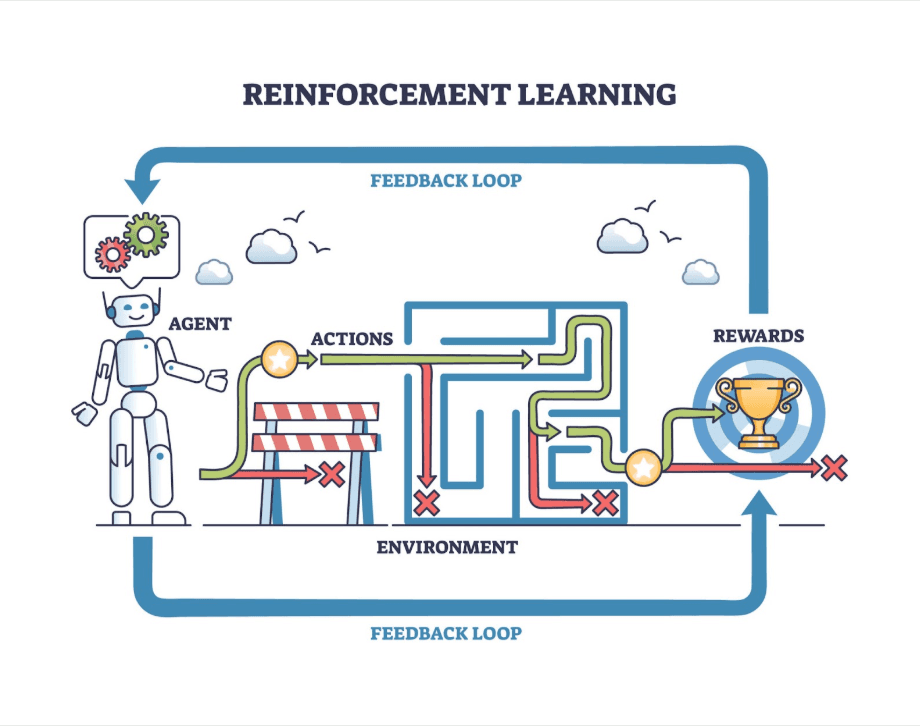
The Feedback Loop: The OODA Loop
Our n8n agent operates on the OODA loop (Observe, Orient, Decide, Act), a military strategy adapted for AI:
- Observe: The agent detects a node failure or a validation error.
- Orient: It captures the error message and the context of what it was trying to do.
- Decide: It consults its Brain (LLM) to determine if it should retry, change tools, or wait.
- Act: It executes the recovery path and checks if the healing worked.
Need a Custom Automation Strategy?
Book a strategic consultation with Flowlyn to build scalable lead generation engines and self-healing workflows.
Book Free Call5 Ways to Implement Self-Healing Logic in n8n
Building a self-healing architecture requires moving away from linear workflows and embracing recursive loops. Here are five patterns we used in our Openclaw-like agent.
1. The Recursive Retry Loop
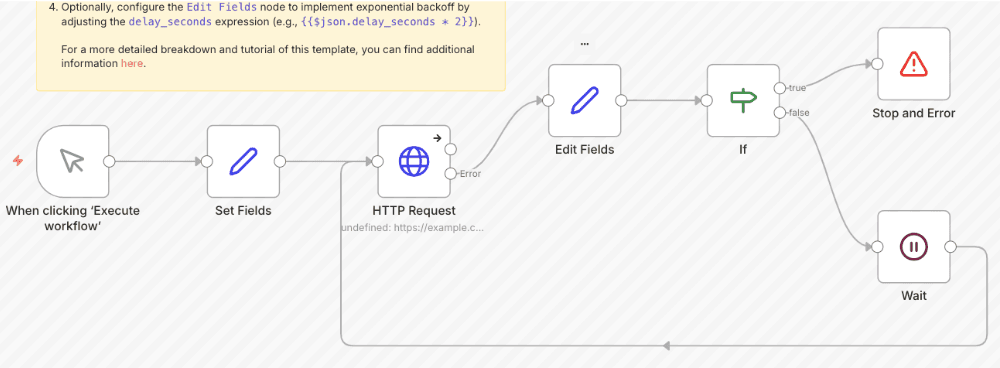
When working with LLMs, the most common failure is a Bad Output. You ask for JSON, but the AI adds a conversational preamble. We built a loop where the agent's output is passed through a Code Node for validation. If the validation fails, the error is sent back to the LLM with the instruction: "Your previous output was invalid JSON. Here is the error: [Error]. Please fix it and return only the JSON."
2. Dynamic Tool Selection
Our agent has access to multiple tools for the same task. For example, if it needs to scrape data, it first tries a fast, low-cost HTTP Request. If that gets blocked by a firewall, the agent automatically switches to a more robust (but slower) headless browser tool like browserless.io. It heals the connection by finding a path that works.
3. Prompt Auto-Optimization
Not all prompts work forever. As models update, prompt performance can drift. Our agent tracks a Success Score for different prompt versions. If it notices that a specific task is failing more often, it uses a meta-prompting node to heal the low-performing prompt, tweaking the instructions based on historical success data.
4. Auto-Updating Selectors
Web scraping is notoriously brittle because CSS selectors change constantly. When our agent fails to find an element on a page, it doesn't stop. It captures the HTML body of the page and sends it to an LLM. The AI inspects the new HTML, identifies where the data has moved, and updates the selector in the workflow’s memory for the next attempt.
5. Failure Context Injection
When a node fails in n8n, it generates a stack trace. We use an Error Trigger to capture this specific technical context and inject it directly back into the AI Brain. Instead of the agent guessing what went wrong, it sees the exact line of code or API response that caused the crash, allowing for a much more intelligent repair strategy.
How to Do It: Building the Self-Healing Engine in n8n
Building this doesn't require a degree in computer science, but it does require a structured approach to workflow design.
Step 1: The Error Trigger Global Workflow
Don't build error handling into every single workflow. Instead, create one dedicated Sub-workflow that acts as the Emergency Room. Use the Error Trigger node to listen for failures across your entire n8n instance. This sub-workflow is the central hub for all healing actions.
Step 2: The Diagnostic Node
Once the error is caught, pass the error.message and error.stack into an AI Agent Node. This node's sole job is classification. It should output a category: TRANSIENT (retry immediately), LOGIC (fix the prompt), or FATAL (requires human help).
Step 3: State Persistence
To prevent the agent from getting stuck in an infinite loop of fixing itself, you must track attempts. We use a Postgres Node (or n8n Static Data) to store the Attempt Count. If the count exceeds 3, the agent moves to the human fallback.
Step 4: The Recovery Action
Based on the diagnosis, the agent selects a path. If it's a network timeout, it implements an exponential backoff. If it’s a tool failure, it switches to a secondary API. This is where you map your Repair nodes to the classifications made in Step 2.
Step 5: The Human Fallback Gate
A self-healing agent is smart enough to know when it’s beaten. If the agent fails three times, it uses a Slack Node to call for help. However, instead of just saying "It broke," it provides a full report: "I tried to scrape this site 3 times using HTTP and Headless Browser. Both failed due to a new CAPTCHA. Please take over."
Why This Matters for 2026
As we move deeper into 2026, the expectations for automation are shifting. Set it and forget it only works if the software is resilient.
- Zero Downtime: For 24/7 operations like customer support or financial monitoring, you cannot afford to wait for a developer to wake up and fix a minor API change.
- Reduced Maintenance: The highest hidden cost of automation is the Maintenance Tax, the hours spent every week fixing small bugs. Self-healing agents drastically reduce this tax.
- The Path to AGI: We are moving away from scripted automation toward truly autonomous, resilient software. This is the foundation of Agentic Workflows.
The reliability of these agents depends heavily on the infrastructure they run on. If your server is underpowered, your agent will struggle to process complex diagnostic tasks. Finding the best servers to host n8n is a crucial first step in ensuring your Self-Healing workflows have the resources they need to think and react in real-time.
Wrapping Up
The era of fragile automation is ending. By building self-healing logic into your n8n workflows, you create agents that are not just tools, but reliable digital employees. They handle the noise of the internet so you can focus on high-level strategy.
Building these autonomous engines can be technically demanding. If you're looking to implement a resilient, self-healing architecture for your business without trial and error, our team can help. Explore our custom n8n workflow services to see how we can build your next-generation AI workforce.
Ready to Build Resilient Workflows?
Book a strategic consultation with Flowlyn to map out and implement your self-healing automation.
Book Free Call
About Divyesh Savaliya
Divyesh leads Flowlyn with 12+ years of experience designing AI-driven automation systems for global teams.
In This Article